Product & Feature
Safe, convenient in-person services with TIMIFY virtual queue management

Updated: Published:
A new TIMIFY application dedicated to virtual queue management for drop-in customers booking appointments in a convenient, socially distanced manner


TIMIFY
TIMIFY is an appointment scheduling and resource management software for teams and enterprises
A new TIMIFY application dedicated to virtual queue management for drop-in customers booking appointments in a convenient, socially distanced manner

TIMIFY's booking solution is the perfect system to combine in-person and phone booking with online – and now, with the launch of the Q App, drop-in appointments too.
With drop-in services important to so many industries, it's a crucial feature that allows total efficiency in the merging of unscheduled and pre-booked appointments.
The app also helps to eradicate queues and crowded waiting rooms at your premises, giving freedom and flexibility to waiting clients – not to mention safety in terms of coronavirus and social distancing.
Let's take a closer look at how this app plays a fundamental role in returning customer confidence to drop-in services with a modern, efficient and convenient experience.
What is a queue management app?
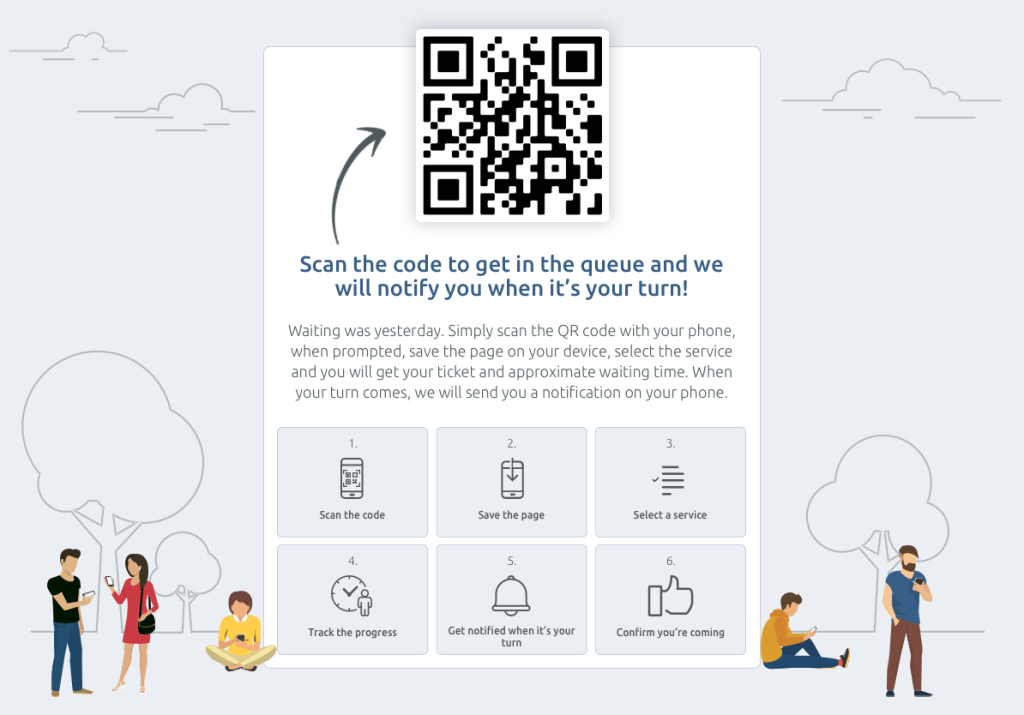
A queue management app is a digital queuing solution that helps businesses effectively manage customer queues by replacing traditional physical lines with a virtual queue system. Acting as a virtual reception desk, it allows drop-in customers to check in via a QR code, join a digital queue, and receive real-time notifications about their queue status and average wait times. The system automatically finds the next available time slot among existing online appointments, helping to streamline operations, optimize staff allocation, and reduce overcrowded waiting rooms. By keeping customers informed and minimizing physical presence, a queue management app enhances the customer experience, improves service delivery, and supports operational efficiency.
What are the benefits?
Implementing a virtual queue management system offers numerous advantages for both businesses and customers, helping to streamline operations and enhance the overall customer experience. Here are the key benefits:
- Revive customer confidence in drop-in services affected by COVID-related disruptions by offering a safe, modern, and contactless queuing solution that supports social distancing and reduces physical queues.
- Reduce customer flow congestion and alleviate pressure on reception staff and public-facing areas, helping to create efficient operations and lower operational costs.
- Allow customers to choose their queue priority status, which is particularly useful in environments like government offices, post offices, or medical settings where urgent service delivery may be required.
- Offer fast, easy access to the queue system using QR codes, enabling clients to check in from inside or outside the premises—without needing to be physically present in a waiting room or physical line.
- Support customer behavior preferences by offering multiple access options, including touchscreen devices, digital queue systems, or even traditional ticket-drawing systems for those without smartphones.
- Provide flexibility during long wait times, allowing customers to leave the premises, run errands, or wait elsewhere while staying updated on their queue status via real-time notifications—ensuring a more relaxed and convenient waiting process.
- Improve customer satisfaction and engagement by offering a smoother, more transparent queuing experience with the ability to adjust or exit the queue when wait times increase unexpectedly.
How do customers use the Virtual Queue System?
The beauty of a virtual queue system is how simple and intuitive it is for customers. From the moment they arrive, the process is designed to deliver a smooth, convenient, and stress-free customer journey. Here's how it works in real life:
- The customer arrives at your location—whether it’s a retail store, government office, post office, or a small business offering in-person services.
- Instead of waiting in a long physical queue, the customer uses their smartphone to scan a QR code placed at the entrance or reception area—sometimes even available outside the building for maximum flexibility.
- After scanning, they’re taken to a user-friendly interface where they choose the service they need. This step personalizes the experience and helps businesses effectively manage customer flow.
- Instantly, the system assigns them a digital ticket number and provides an estimated wait time. This real-time insight into the queue status helps keep customers informed.
- Customers can then monitor their position in the queue right from their device. The best part? They’re free to step away, run an errand, or wait somewhere more comfortable—no need to stay physically present in a crowded waiting room.
- When it’s their turn, your staff simply select the ticket from the system, which automatically sends an instant notification to the customer, calling them in for their appointment.
To find out more visit our website: TIMIFY Virtual Queue Management
How does it work with online booking?
Integrate and promote online appointment booking as the safest and most convenient way to make an appointment for your services while avoiding queues and waiting rooms.
As customers discover the convenience and reliability of online booking, this will reduce the number of people using your drop-in services as a preference rather than a necessity.
This will maximise the impact of using the Q App to improve the experience of your drop-in services for those customers who rely on them the most.
Using TIMIFY's complete solution for online booking, appointment and resource scheduling and the Q App brings synergy to operations across all of your services.
All appointments – whether booked by customers online, by call centres, reception desks or by drop-in clients – are scheduled automatically from a single, shared calendar.
Real-time synchronisation eliminates double bookings, always gives customers the latest availability and auto-reserves essential staff and equipment the moment an appointment is booked.
Find out more
The TIMIFY Q App is available to all Enterprise users.
For much more technical detail on the app's functionality and set-up, read our guidance articles.
If you have any questions about our Q-App please contact one of our representatives now. They will be happy to show you how TIMIFY can help your business offer a convenient and safe experience to your customers with our online and offline booking solutions.

Related articles


Tips & Resources
Queue Management Systems (QMS) 101: How to Control The Flow of Waiting Lines Effectively

15 June, 2022

Tips & Resources
How To Effectively Manage Queues As A Service Business In 5 Simple Steps

19 September, 2023